

TransLocale for DartNative
Add translations to your DartNative app. Keep them in the app so they work offline, let users switch languages, and update published wording through TransLocale.
Yes, OTA translation updates are supported. You can deliver compatible wording changes without releasing a new app version. Adding keys, languages, layouts, or code still needs a new app build.
Get started · Set up OTA updates · AI skills guide · Example app · Get help
Watch the OTA demo
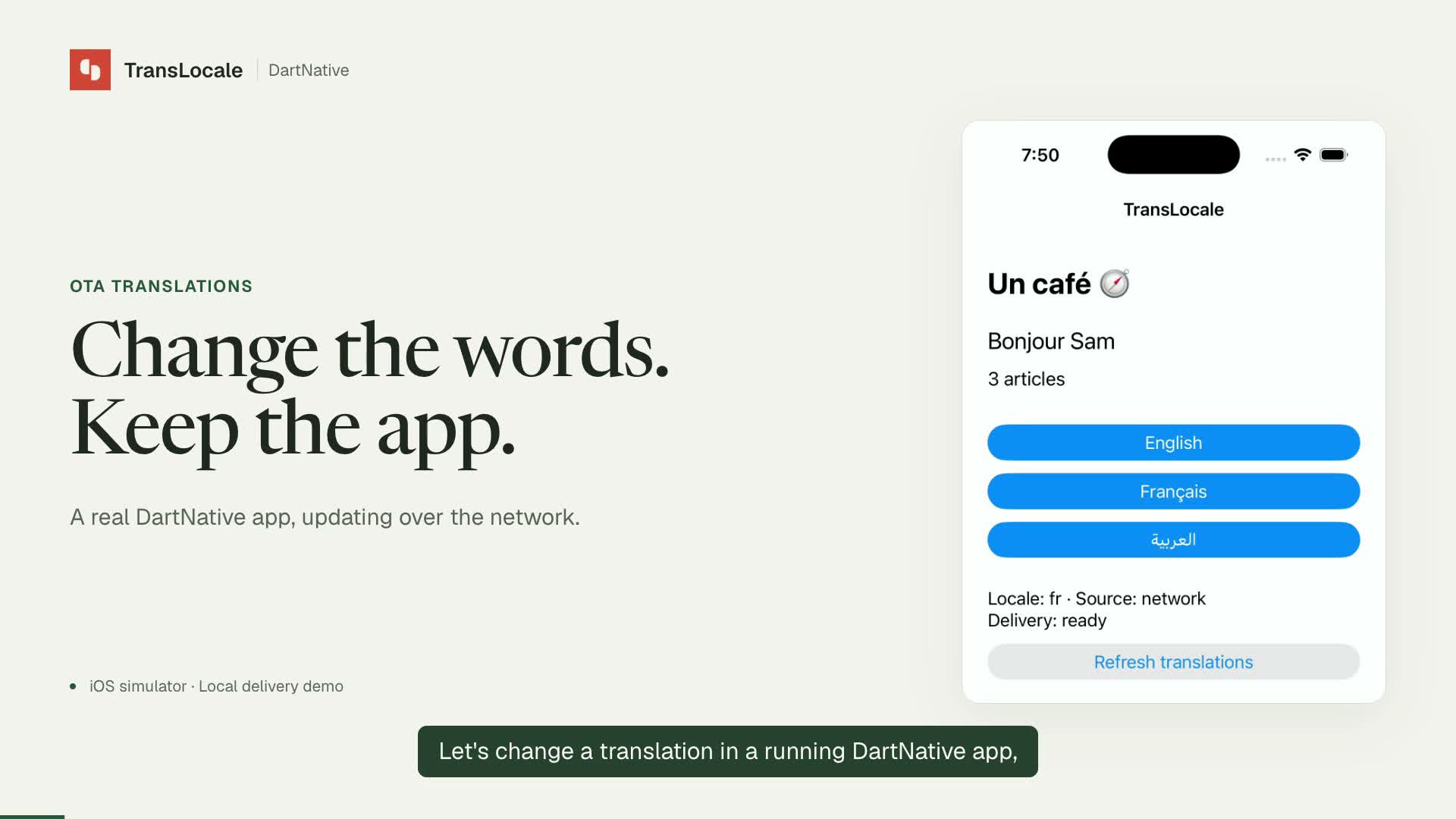
Watch with narration and captions · Read the transcript
See a French greeting change in the running app, then stay available after a restart with the server stopped. This recording uses an iOS simulator and a local delivery demo server. It shows OTA delivery and caching; follow the steps below to connect to the hosted service.
Before you start
You need an existing DartNative app and the DartNative SDK with Dart 3.12.0-192.0.dev or later. This package supports iOS and Android; Android requires API 26 or later. Follow the SDK's platform requirements. With Xcode 27, set the iOS deployment target to at least 15 for the app and its pods.
You can use bundled translations without a TransLocale account. An account is only needed for the hosted service, including OTA updates.
Get started
1. Install the package
Add these entries under dependencies in your app's pubspec.yaml. Keep your existing DartNative dependencies.
dependencies:
  dartnative_system: ^1.0.0
  dartnative_path_provider: ^1.0.0
  translocale_dartnative:
    hosted: https://dartpub.dev
    version: ^0.2.0
Include all three packages. The two native packages let TransLocale read the app version and save downloaded translations.
From your app directory, run:
dn pub get
Use dn pub get so DartNative can resolve its native packages.
2. Add your translation files
Create a l10n folder in your app. Add one ARB file for each language. ARB files are JSON files that hold your translation keys and messages.
Create l10n/app_en.arb:
{
  "@@locale": "en",
  "hello": "Hello, {name}!",
  "@hello": { "placeholders": { "name": { "type": "String" } } },
  "items": "{count, plural, one {One entry} other {{count} entries}}",
  "@items": { "placeholders": { "count": { "type": "int" } } }
}
Create l10n/app_fr.arb:
{
  "@@locale": "fr",
  "hello": "Bonjour, {name} !",
  "items": "{count, plural, one {Une entrée} other {{count} entrées}}"
}
Here, hello and items are the keys your app uses. {name} and {count} are values supplied by your app. The @hello and @items entries define the types of the generated method parameters.
3. Generate the Dart file
Create tool/bundle.dart:
import 'package:translocale_dartnative/bundle.dart';

void main(List<String> arguments) => runBundleCommand(arguments);
Run this from your app directory, using the Dart executable supplied by DartNative:
dart --packages=.dart_tool/package_config.json tool/bundle.dart \
  --arb-dir l10n --source en --catalog app.arb
This creates lib/translocale_bundle.g.dart with a typed AppStrings class and its catalog. Commit it along with your ARB files. app.arb is the name that identifies this catalog in TransLocale; use the same name when setting up OTA updates.
The command only reads local files. It does not upload your messages or start a translation job.
4. Show translations in your app
Use this in lib/main.dart:
import 'package:dartnative/dartnative.dart';
import 'package:translocale_dartnative/translocale_dartnative.dart';
import 'dartnative_plugin_registrant.dart';
import 'translocale_bundle.g.dart';

void main() {
  DartNativePluginRegistrant.registerAll();
  final translations = TransLocale(catalog: translocaleCatalog, locale: 'en');
  runApp(App(
    title: 'My app',
    home: TransLocaleBuilder(
      translations: translations,
      builder: (context, strings) => Scaffold(
        body: SafeArea(
          child: Column(children: [
            Text(strings.hello(name: 'Sam')),
            Text(strings.items(count: 3)),
            Button(
              onPressed: () => translations.setLocale('fr'),
              child: const Text('Français'),
            ),
          ]),
        ),
      ),
    ),
  ));
}
dn pub get generates the plugin registration file. Keep the call to registerAll() before runApp.
Create TransLocale once, outside build. Put TransLocaleBuilder inside App, above the screens that need translations. The builder disposes of the controller when it is removed, so do not share one controller between builders.
5. Run the app
dn run
You should see Hello, Sam! and 3 entries. Tap Français to see Bonjour, Sam ! and 3 entrées.
After changing an ARB file, run the bundle command again with --replace:
dart --packages=.dart_tool/package_config.json tool/bundle.dart \
  --arb-dir l10n --source en --catalog app.arb --replace
Use --check instead of --replace in CI to check that the generated file is up to date. Do not format the generated file.
Set up OTA updates (optional)
OTA means over-the-air updates: your app downloads approved translations from TransLocale. It shows bundled messages immediately, then applies compatible updates. Downloaded messages are saved for offline use and later app launches.
1. Create a TransLocale project
Open Projects, choose New project, and use English as the source language and French as the target. In Catalogs → Import files, import the source and French ARB files under the same catalog name, app.arb, choosing Flutter ARB and each file’s language. The screenshot walkthrough covers account setup, keys, review, and release creation; use ARB for this app rather than its i18next sample. Find your project UUID under Project settings → Credentials.
The source keys, placeholder types, catalog name, and target languages must match the app.
2. Get your app's schema hash
The schema hash identifies the translation structure your app understands. It prevents the app from loading an incompatible release.
With Node.js 22.16 or later installed, run:
npm install --save-dev @translocale/cli@^0.6.1
Create release-schema.json in your app directory:
{
  "sourceLocale": "en",
  "locales": ["fr"],
  "catalogs": [
    { "file": "app.arb", "format": "arb", "path": "l10n/app_en.arb" }
  ]
}
Then run:
npx translocale release-schema --file release-schema.json
Copy the returned schemaHash. This command runs locally and does not start a translation job. Run it again when you change source keys, placeholders, or supported languages.
3. Publish a preview release
In the Editor, select the French keys, choose Review selected, and approve the wording. Open Releases → New release, review and create the snapshot, then publish it to Preview. The app-version range must include your installed version.
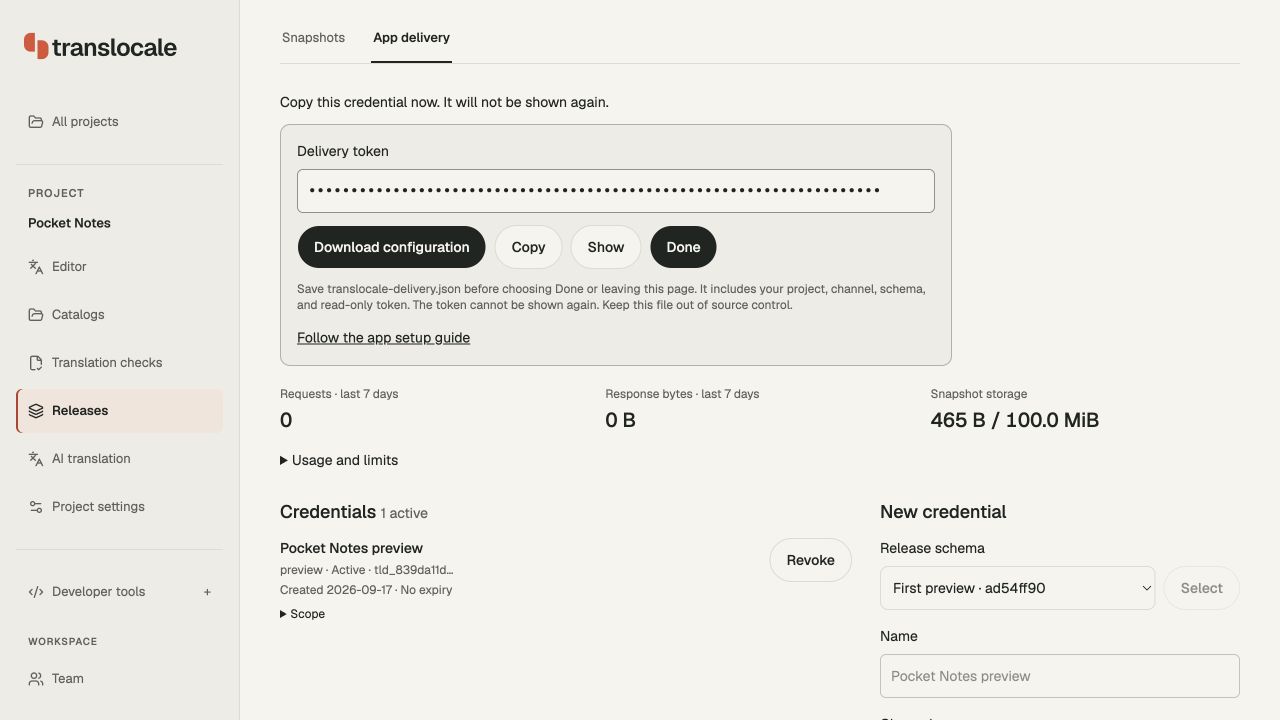
Open Releases → App delivery, select the release schema, and create a Preview credential. Choose Download configuration while the one-time token panel is open. The file contains the project ID, schema hash, API origin, channel, and read-only delivery token. Compare its schemaHash with the local result from step 2 before building.
4. Connect your app
Save the downloaded translocale-delivery.json in your app directory and add that filename to .gitignore. Supply it through your build environment. If you lose it, revoke the old credential under App delivery and issue a replacement. Project authoring tokens from Project settings → Credentials must stay in developer tools or CI.
In lib/main.dart, replace the TransLocale creation from the quick start with:
final translations = TransLocale(
  catalog: translocaleCatalog,
  locale: 'fr',
  delivery: DartNativeDelivery(
    projectId: const String.fromEnvironment('projectId'),
    schemaHash: const String.fromEnvironment('schemaHash'),
    token: const String.fromEnvironment('deliveryToken'),
    channel: const String.fromEnvironment('channel'),
    apiBaseUrl: const String.fromEnvironment('apiBaseUrl'),
  ),
);
The delivery token is included in the built app and can be extracted. Only use a read-only delivery token here. Keep authoring credentials in development tools, CI, or the dashboard.
5. Try an update
Run the app with your delivery settings:
dn run --dart-define-from-file=translocale-delivery.json
Publish a different French message to the same preview channel. The app checks after the first frame and then every five minutes while it is in the foreground. You can call await translations.check() to refresh sooner. If an update does not appear, inspect translations.state.status and translations.state.error.
For production, publish to the production channel, create a delivery credential for that channel, download its configuration and use that file for the production build. A Preview credential cannot read Production.
Installation, bundle generation, schema checks, and delivery requests do not start paid translation jobs.
Use with Codex or Claude Code
Our AI skills guide explains how to install the TransLocale skill and connect your assistant to a project through MCP.
Tell your assistant that your app uses DartNative and share this README. The guide covers skill installation and cloud workflows; use the DartNative setup steps above for this package. Translation jobs still need your approval and a character cap.
Common tasks
| Task | How |
|---|---|
| Change language | translations.setLocale('fr') |
| Get a translated string | translations.strings.hello(name: 'Sam') |
| Access translations in a child widget | TransLocaleScope.of<AppStrings>(context).strings |
| Display right-to-left text | Use TransLocaleText<AppStrings>((s) => s.hello(name: 'Sam')) for native direction and alignment |
| Check for an OTA update now | await translations.check() |
| Turn off automatic updates | Set automaticUpdates: false on TransLocaleBuilder; call check() yourself |
Your app chooses the language explicitly. A locale such as fr-CA falls back to fr, then to the source language. For each key, TransLocale tries downloaded wording, bundled wording for that language, then bundled source wording. If no usable message exists, it returns the key. Generated accessors prevent unknown keys and incorrect argument types in statically checked application code.
Delivery options
These options belong to DartNativeDelivery:
| Option | Default | What it does |
|---|---|---|
projectId, schemaHash, token |
Required | Select the project and compatible release |
channel |
production |
Choose the release channel; use preview for testing |
apiBaseUrl |
https://translocale.io |
Set the HTTPS service URL; local tests may use loopback HTTP |
appVersion |
Installed app version | Override the automatically detected version |
persistentCache |
true |
Keep validated updates after restarting the app |
cache |
Native file cache | Supply a custom DeliveryCache |
pollInterval |
Five minutes | Set the refresh interval, from 30 seconds to one hour |
TransLocaleBuilder starts delivery and pauses polling when the app goes into the background. Network failures leave the last validated wording available. If you use a controller without the builder, call start(), handle foreground changes with setActive, and dispose of it yourself.
Typed messages
The generator creates a getter for each message without placeholders and a method with required named parameters for each message with placeholders. Keep source placeholder types explicit: String, int, double, num, or DateTime. Broad Object, dynamic, nullable types, missing metadata, and invalid Dart identifiers fail generation before the existing output is changed.
final strings = translations.strings;
strings.hello(name: 'Sam');
strings.items(count: 3);
// strings.hello();          // Missing required argument.
// strings.items(count: '3'); // Wrong argument type.
The generated strings remain attached to their controller. Read them during each build so locale changes and delivered wording appear immediately. TransLocaleBuilder supplies the typed strings and rebuilds on updates. In a descendant widget, use TransLocaleScope.of<AppStrings>(context).strings, or a typed text selector:
TransLocaleText<AppStrings>(
  (strings) => strings.hello(name: 'Sam'),
)
Use --class-name CheckoutStrings when a catalog needs a different generated class name. Keys remain unchanged in the catalog; reserved names and identifier collisions produce an error instead of silently renaming keys.
Number formatting comes from ARB format and optionalParameters. Date placeholders require a supported DateFormat skeleton such as yMd; custom patterns require isCustomDateFormat: true. Generated code initializes bundled date data and formats each fallback using that message's locale. App code supplies raw numbers and dates; numeric plural selection keeps the original value. Unsupported formats and options fail generation.
Generation is local. Run --check and Dart analysis in CI. Changes to keys, parameter types, formatting metadata, or supported locales also require recomputing the existing release schema and shipping a compatible app build. OTA can update wording within that contract.
Updating the 0.1.0 example
Regenerate the bundle. Replace t.text('hello', arguments: {'name': 'Sam'}) with translations.strings.hello(name: 'Sam'). The builder's second argument is now the generated strings; call setLocale, check, and other lifecycle methods on the controller. Replace string-key TransLocaleText calls with typed selectors. There is no legacy string-key widget API in 0.2.0.
Supported messages and limits
The package supports one catalog per controller and up to 200 source messages, with no fixed target-language count limit. Each ARB file needs @@locale and must be at most 100 KB.
Messages can use placeholders, select, and cardinal plurals with zero, one, two, few, many, and other branches. The formatter also accepts =0, =1, and =2; prefer category names for portability.
Ordinals, plural offsets, other exact-number branches, rich text, and inline date or number formatting are not supported. For dates and numbers, declare source ARB formatting metadata and pass raw values to the generated methods. Metadata determines generated types and formatting; it also participates in release schema checks.
This package generates its own typed messages for DartNative. Flutter apps use Flutter's gen-l10n and the TransLocale Flutter packages.
Troubleshooting
| Problem | What to check |
|---|---|
| Native packages will not resolve | Run dn pub get and include both native dependencies from step 1. Development-only dependency_overrides in pubspec_overrides.yaml can hide SDK overrides. |
| OTA wording does not appear | Check translations.state.error. Make sure the project, channel, schema hash, token, and installed app version match a published release. |
An app_version error appears |
Keep native plugin registration, or provide appVersion yourself. Version lookup times out after three seconds; retry with check(). |
| Arabic text stays left aligned | Use TransLocaleText, or set both direction and alignment on your native Text view. |
The generator says Bundle is stale |
Run the bundle command with --replace and review the changed Dart file. |
For a larger example with English, French, and Arabic, see the example app. Report problems in GitHub issues.
License
This package is MIT licensed. The TransLocale hosted service is proprietary.
Automatic delivery reporting
Reports also include SDK package/version, latest wording source and cache state, the previous check outcome, fixed cache failure categories, and download/validation durations for successful updates. Random event IDs deduplicate retransmission. Reporting uses existing checks, with no extra requests or public settings.
The updated delivery runtime automatically reports a random project-scoped installation ID, platform/runtime, app version, verified active release, and fixed error category with its existing OTA checks. Reports go to the configured TransLocale delivery origin for the internal operations dashboard. There is no reporting configuration. The delivery cache stores the ID separately from release wording; custom storage must honor each key. Missing or blocked storage produces session counts instead of persistent installation counts. Reports contain no wording or hardware identifiers, and reporting failures do not interrupt translation delivery. TransLocale stores project-scoped hashes and retains observations for 90 UTC days. These measurements require the updated shared delivery package and service.