native_rich_text
Native rich-text editing for DartNative on iOS and Android.
Use native selection and typing with bold, italic, headings, links, numbered lists, bullets, and checklists. A customizable toolbar is included. Export Quill Delta JSON and use your own storage and authentication.
This initial release supports a subset of Quill formatting. See the supported features and current limits below.
Add the package
dependencies:
  native_rich_text:
    hosted: https://dartpub.dev
    version: ^0.1.0
Run dn pub get. DartNative's generated registrant initializes the native plugin before runApp().
Create an editor
import 'package:native_rich_text/native_rich_text.dart';

final controller = NativeRichTextController(
  initialDocument: RichTextDocument.fromDelta([
    {'insert': 'My notes'},
    {'insert': '\n', 'attributes': {'header': 1}},
    {'insert': 'First item'},
    {'insert': '\n', 'attributes': {'list': 'bullet'}},
  ]),
);

// Give the editor a bounded height in your layout.
Expanded(child: NativeRichTextEditor(controller: controller));

NativeRichTextToolbar(controller: controller);

// You can also call commands directly after the editor mounts.
controller.toggleBold();
controller.toggleItalic();
controller.setHeading(2);       // Levels 1–6; null restores a paragraph.
controller.setBulletList(true);
controller.setNumberedList(true);
controller.setChecklist(true);
controller.toggleChecked();
controller.setLink('https://example.com'); // Select text first.
controller.setLink(null); // Remove the selected link.
controller.undo();
controller.redo();
The editor works with or without the included toolbar.
One controller belongs to one editor. Commands run on the UI isolate and require a mounted editor. Use a new widget key when replacing its controller. Remounting the same controller restores its last committed document in a new native session; undo history resets. Dispose the controller when its owner is disposed.
Customize the toolbar
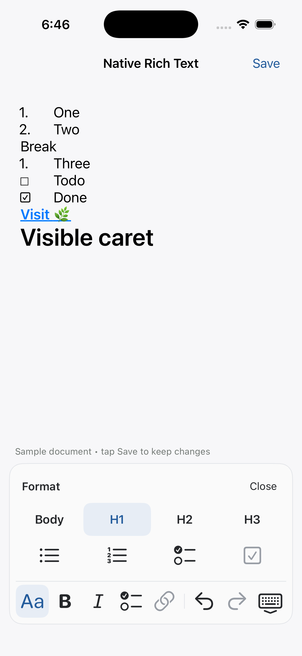
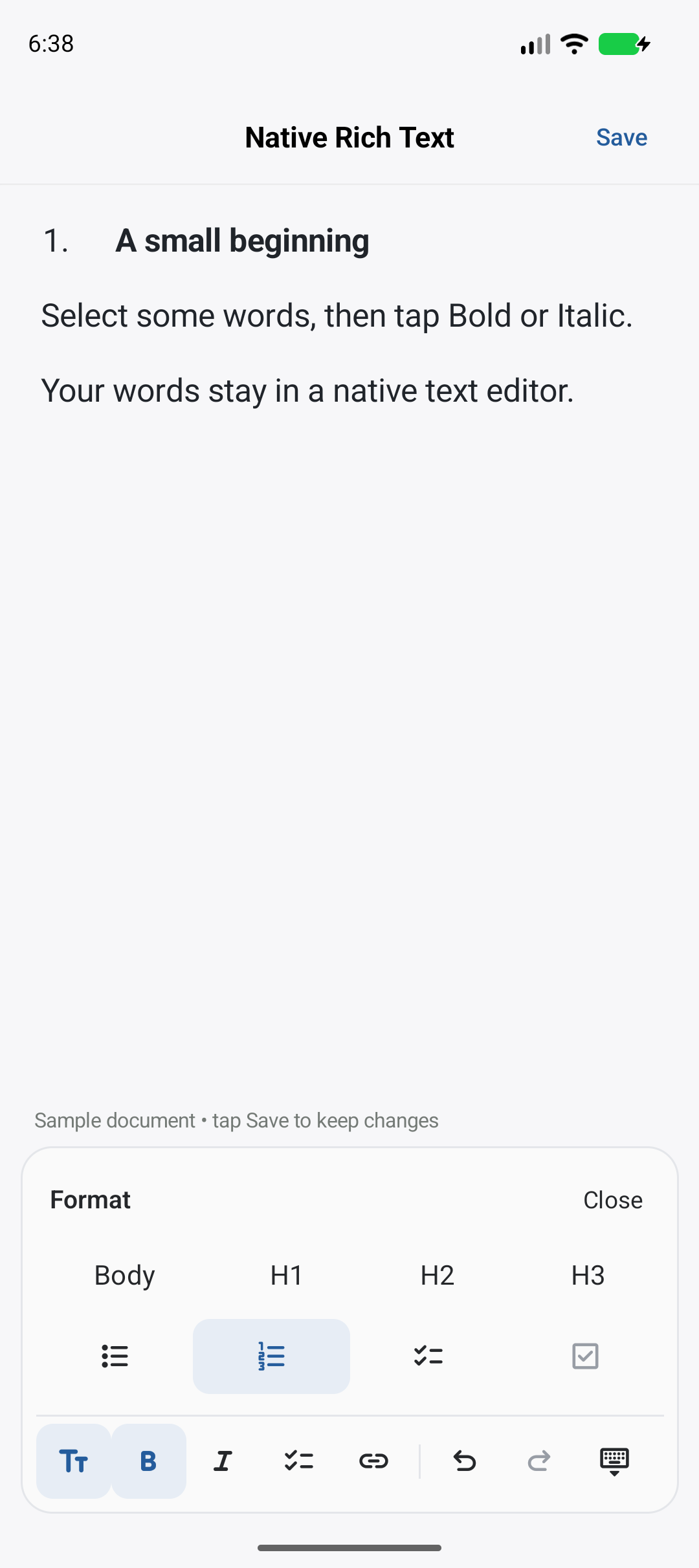
NativeRichTextToolbar includes SF Symbols on iOS, Material Symbols on Android, selected and disabled states, and light/dark colors. The compact strip opens a format panel for headings and lists. Link editing keeps the original selection and rejects changes if the document changed while the address was being entered.
NativeRichTextToolbar(
  controller: controller,
  theme: const RichTextToolbarTheme(
    selectedBackground: Color(0xFFE9E4F5),
    selectedForeground: Color(0xFF65469B),
    radius: 16,
  ),
  actions: const [
    RichTextToolbarAction.format,
    RichTextToolbarAction.bold,
    RichTextToolbarAction.italic,
    RichTextToolbarAction.link,
    RichTextToolbarAction.divider,
    RichTextToolbarAction.undo,
    RichTextToolbarAction.redo,
  ],
);
Import package:dartnative/dartnative.dart for Color and other UI types.
| Option | What it changes |
|---|---|
actions, formatActions |
Tools and their order in the strip and format panel |
theme |
Colors, button/icon sizes, padding, corners, and border; omit to follow the SDK's platform brightness |
layout |
Horizontal scrolling by default, or RichTextToolbarLayout.wrap |
icons |
An SF Symbol name and Android IconData for each action |
labels, strings |
Accessible button names and translated panel, link, and error text |
buttonBuilder |
Your own buttons, supplied with the label, icon, selected state, and enabled callback |
trailing |
Extra widgets for app-specific actions |
onOpenLink, onError |
Handle URL opening and report command errors |
For example, replace the checklist icon:
icons: const {
  RichTextToolbarAction.checklist: RichTextToolbarIcon(
    iosSymbol: 'checkmark.circle',
    androidIcon: MaterialSymbolsRounded.check_circle,
  ),
},
Place the toolbar in a bounded layout with the editor, accounting for safe areas and keyboard insets as the example does. The default buttons have at least 44-point tap targets and accessible names. Custom button builders own their sizing and accessibility. The default panel exposes Body and H1–H3; the controller supports heading levels 1–6.
The toolbar never saves documents or opens URLs by itself. Supply onOpenLink to offer an Open link action; otherwise a tapped link displays its address with a Close action.
Save and load
Use documentChanges for autosave and addListener for toolbar state:
final subscription = controller.documentChanges.listen((change) {
  final delta = change.after.toDeltaJson();
  // Persist delta using your app's storage layer.
});

final state = controller.refresh();
if (!state.composing) {
  final delta = state.document.toDeltaJson();
  // Explicitly save delta if needed.
}

controller.load(RichTextDocument.fromDelta(savedDelta));
// load() replaces the document and clears undo history.
Cancel your subscription when its owner is disposed. Document notifications exclude selection-only changes and active composition previews. The controller polls every 50 ms and replays committed edits in order. Streams deliver events asynchronously. If its replay queue expires, it recovers a snapshot and emits one document change with origin recovery.
toDeltaJson() produces the operation list accepted by Flutter Quill. encode() produces a versioned envelope, {"version":2,"ops":[...]}. decode() accepts that envelope, an ordinary {"ops":[...]} object, a Delta operation list, or the original version-1 run format. Legacy documents gain the required terminal newline.
plainText includes that final newline; embeds appear as U+FFFC. Selection offsets use UTF-16 code units. Ranges that split a surrogate pair are rejected. Documents are limited to 100,000 UTF-16 units, including the terminal newline.
Observe individual edits
controller.transactions.listen((edit) {
  // edit.delta, edit.inverse, edit.origin, and selection before/after.
});
controller.recoveries.listen((reason) {
  // For example: queue_gap when older edits have expired.
});

controller.commitComposition();
controller.cancelComposition();
controller.resynchronize(); // Request a fresh committed snapshot.
documentRevision counts committed transactions. revision also tracks selection and other UI changes. During composition, state.document remains the committed document while selection describes the live native editor. Transaction and recovery streams describe a local session; they do not implement collaborative editing.
Work with documents without a view
import 'package:native_rich_text/document.dart';

final document = RichTextDocument.decode(savedJson);
final unsupported = RichTextCapabilities.current
    .unsupportedFeatures(document);
This entry point uses pure Dart. Parsing and exporting do not initialize native bindings or require a mounted editor.
The codec preserves unknown attributes and embeds. The native editor accepts bold, italic, links, heading levels 1–6, bullets, numbered lists, and checked/unchecked checklist items. Constructing a controller or calling load() with unsupported content throws UnsupportedRichTextException before replacing the editor's document. The caller can retain the original document or open it in another editor. Unsupported content is never silently flattened.
Editing behavior
- Block commands affect every paragraph touched by the selection. A range ending at the start of the next paragraph excludes that paragraph.
- Heading and list styles are mutually exclusive. Clearing them preserves inline emphasis.
- Enter continues a list. A new item after a completed checklist item starts unchecked. Enter on an empty list item restores a plain paragraph without inserting another newline.
- Numbering starts at 1 for each uninterrupted ordered list and updates after edits. Markers are drawn separately; they do not occupy document positions. Nested lists and custom starting numbers are not supported yet.
- Deleting a paragraph's newline merges into the following paragraph's style. Heading-to-paragraph Enter shortcuts are not implemented yet.
- Native commands check the session and revision.
setHeading,setList, andsetLinkaccept an optionaltargetstate for delayed actions; a stale target throwsRichTextExceptionwithstale_revisionorstale_session. - Formatting and document commands return
composition_in_progresswhile the keyboard is composing. Let composition finish before retrying.
Links and checklists
controller.setList(RichTextListType.ordered);
controller.setList(RichTextListType.unchecked);
controller.setList(null); // Restore ordinary paragraphs.

controller.linkActivations.listen((link) {
  // link.url, link.start, and link.end identify the tapped link.
  // Open it with your app's URL launcher or navigation handler.
});
setLink(url) applies to selected text. At a caret inside an existing link, it updates that whole link. Passing null removes it. New links need a nonempty selection. Supported URLs use http, https, mailto, or tel; invalid URLs fail before editing. Other schemes survive document parsing but cannot currently be edited natively.
A tap on a link emits an activation without opening another app automatically. The example previews the URL and offers Open link, using DartNative's URL launcher. Typing inside a link retains it; typing at its end creates ordinary text. Link activations are transient UI events, retained up to 32 per native session until observed.
Tap a checkbox or call toggleChecked() to change completion. For a selection containing several checklist items, the command checks them all unless they are already all checked. The change is undoable and preserves the selection. state.listType and state.link let a custom toolbar reflect the current selection.
Example and requirements
cd example
dn pub get
dn run -d <device-id>
The example saves unencrypted JSON in its own sandbox. Use sample text. It has no application-specific services or data dependencies.
Requires DartNative, Android 11+ or iOS platform support matching your installed SDK, and the usual native build tools. The plugin targets iOS 15; the installed SDK's simulator engine was built for iOS 18.5, so simulator validation uses iOS 26.4. The example also runs on an iPhone with iOS 27.0. Configure your own signing team for a physical iPhone.
Development status
The editor uses UITextView on iOS and EditText on Android. Paragraph metadata is stored separately from its visual styling; headings do not become inline bold, and bullets do not become text characters.
History stores forward and inverse edits, with up to 100 undo groups. Toolbar and platform undo use the same history. Composition previews stay native; committing creates one undo step, and cancelling restores the previous document and selection.
Embeds, nested lists, and rich clipboard interchange remain future work. Physical keyboards, third-party IMEs, dictation, screen-reader interaction, and long-document performance need broader validation.
See architecture and testing for the implementation boundaries and evidence.